# Search-R1: Train your LLMs to reason and call a search engine with reinforcement learning
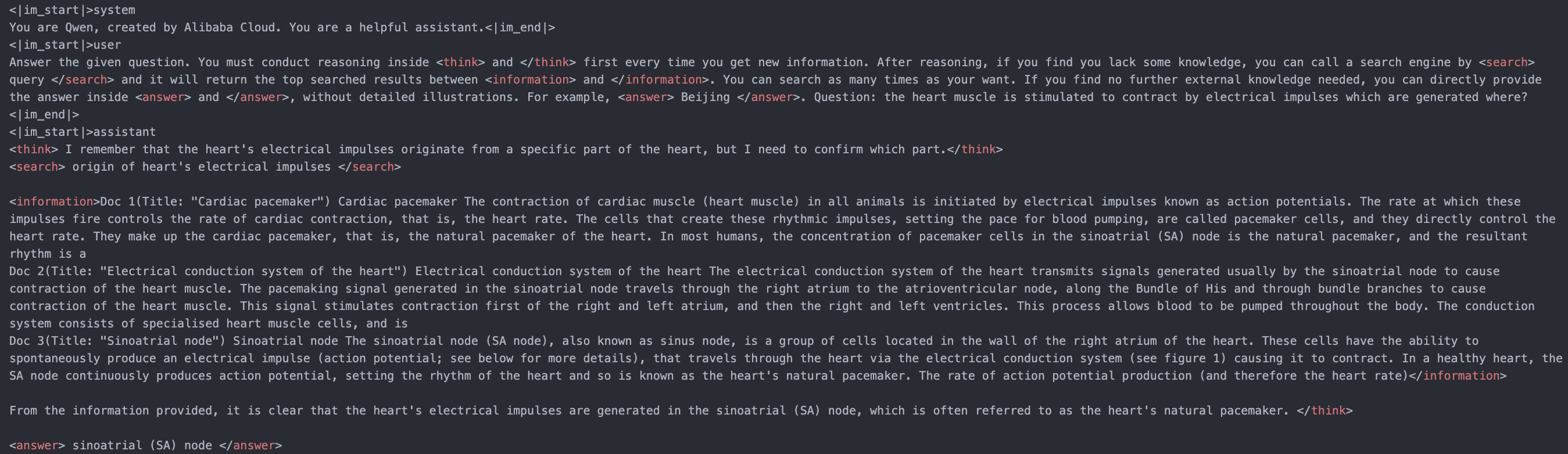
Search-R1 is a reproduction of DeepSeek-R1(-Zero) methods for training reasoning and searching (tool-call) interleaved LLMs. We built upon [veRL](https://github.com/volcengine/verl).
Through RL (rule-based outcome reward), the 3B **base** LLM (both Qwen2.5-3b-base and Llama3.2-3b-base) develops reasoning and search engine calling abilities all on its own.
Twitter thread: [link](https://x.com/BowenJin13/status/1895544294473109889); Full experiment log: [link](https://wandb.ai/peterjin/Search-R1-open)
Paper: [link](); Model and data: [link](https://huggingface.co/collections/PeterJinGo/search-r1-67d1a021202731cb065740f5);
The paper will be released soon!
## Links
- [Installation](#installation)
- [Quick start](#quick-start)
- [Preliminary results](#preliminary-results)
- [Use your own dataset](#use-your-own-dataset)
- [Use your own search engine](#use-your-own-search-engine)
- [Ackowledge](#acknowledge)
- [Citations](#citations)
## Installation
### Search-r1 environment
```bash
conda create -n searchr1 python=3.9
conda activate searchr1
# install torch [or you can skip this step and let vllm to install the correct version for you]
pip install torch==2.4.0 --index-url https://download.pytorch.org/whl/cu121
# install vllm
pip3 install vllm==0.6.3 # or you can install 0.5.4, 0.4.2 and 0.3.1
# verl
pip install -e .
# flash attention 2
pip3 install flash-attn --no-build-isolation
pip install wandb
```
### Retriever environment (optional)
If you would like to call a local retriever as the search engine, you can install the environment as follows. (We recommend using a seperate environment.)
```bash
conda create -n retriever python=3.10
conda activate retriever
# we recommend installing torch with conda for faiss-gpu
conda install pytorch==2.4.0 torchvision==0.19.0 torchaudio==2.4.0 pytorch-cuda=12.1 -c pytorch -c nvidia
pip install transformers datasets
## install the gpu version faiss to guarantee efficient RL rollout
conda install -c pytorch -c nvidia faiss-gpu=1.8.0
## API function
pip install uvicorn fastapi
```
## Quick start
Train a reasoning + search LLM on NQ dataset with e5 as the retriever and wikipedia as the corpus.
(1) Download the indexing and corpus.
```bash
save_path=/the/path/to/save
python scripts/download.py --save_path $save_path
cat $save_path/part_* > $save_path/e5_Flat.index
gzip -d $save_path/wiki-18.jsonl.gz
```
(2) Process the NQ dataset.
```bash
python scripts/data_process/nq_search.py
```
(3) Launch a local retrieval server.
```bash
conda activate retriever
bash retrieval_launch.sh
```
(4) Run RL training (PPO) with Llama-3.2-3b-base.
```bash
conda activate searchr1
bash train_ppo.sh
```
## Preliminary results
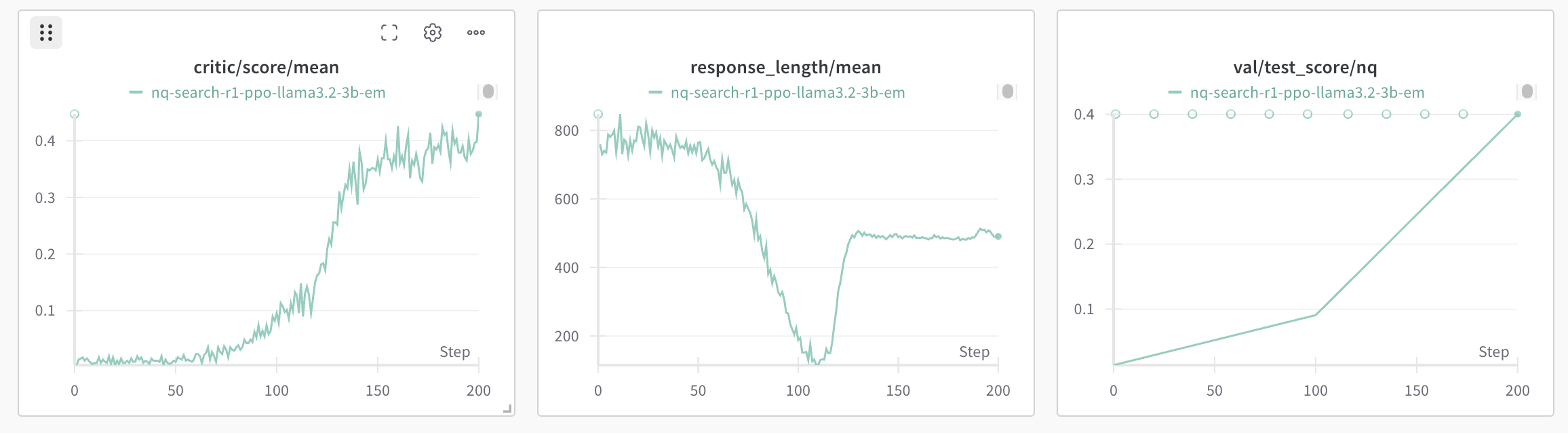
(1) The base model (llama3.2-3b-base) learns to call the search engine and obtain improved performance.
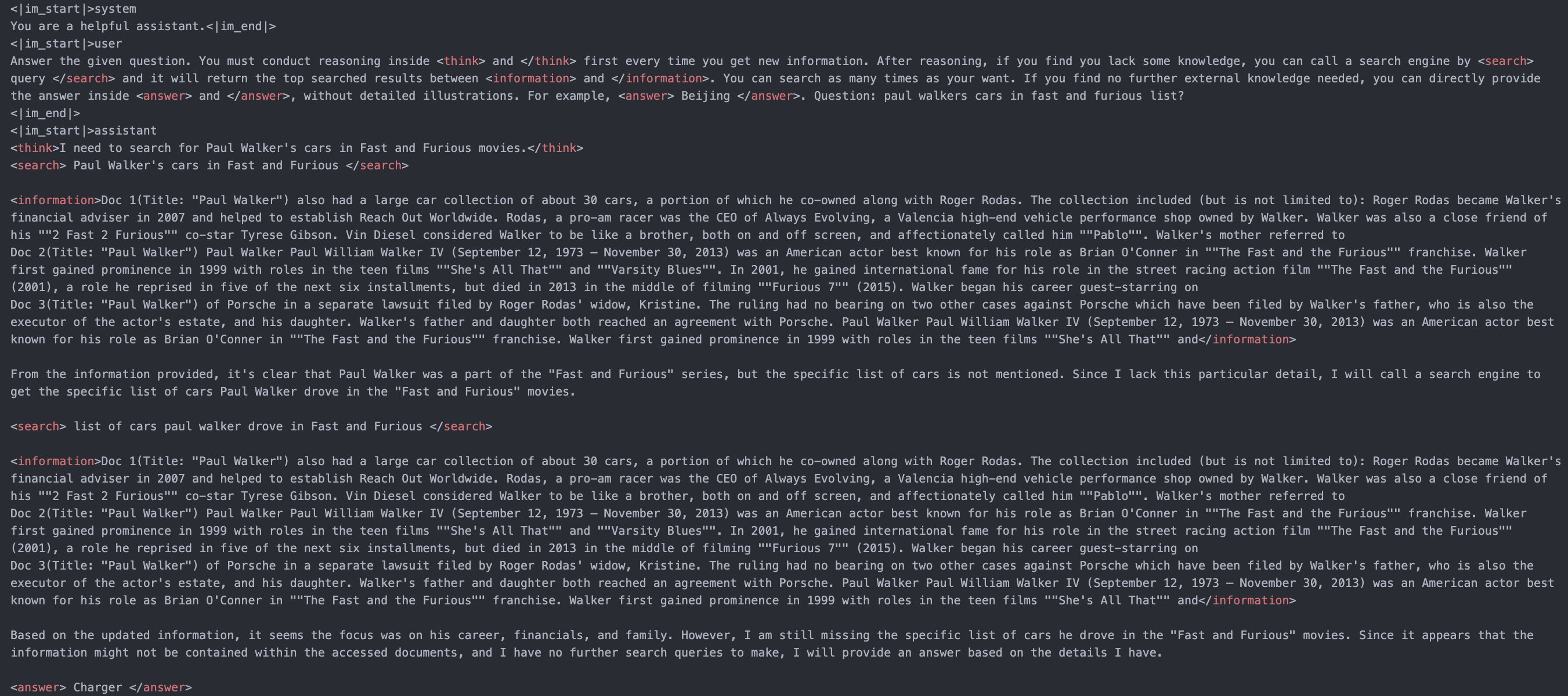
(2) The base model (Qwen2.5-7b-base) can learn to conduct multi-turn search engine calling and reasoning with RL.
## Use your own dataset
### QA data
For each question-answer sample, it should be a dictionary containing the desired content as below:
```
data = {
"data_source": data_source,
"prompt": [{
"role": "user",
"content": question,
}],
"ability": "fact-reasoning",
"reward_model": {
"style": "rule",
"ground_truth": solution
},
"extra_info": {
'split': split,
'index': idx,
}
}
```
You can refer to ```scripts/data_process/nq_search.py``` for a concrete data processing example.
### Corpora
It is recommended to make your corpus a jsonl file, where each line (a dictionary with "id" key and "contents" key) corresponds to one passage. You can refer to ```example/corpus.jsonl``` for an example.
The "id" key corresponds to the passage id, while the "contents" key corresponds to the passage content.
For example:
```
{"id": "0", "contents": "Evan Morris Evan L. Morris (January 26, 1977 \u2013 July 9, 2015) was a lobbyist for Genentech and its parent corporation Roche in Washington."}
...
{"id": "100", "contents": "Three years later, when the United States Exploring Expedition to little-known portions of the globe was organised under Charles Wilkes, Hale was recommended, while yet an undergraduate."}
...
```
**Index your corpora (optional).**
If you would like to use a local retriever as the search engine, you can index your own corpus by:
```
bash search_r1/search/build_index.sh
```
You can change ```retriever_name``` and ```retriever_model``` to your interested off-the-shelf retriever.
## Use your own search engine
The main philosophy is to launch a local or remote search engine server separately from the main RL training pipeline.
The LLM can call the search engine by calling the search API (e.g., "http://127.0.0.1:8000/retrieve").
You can refer to ```search_r1/search/retriever_server.py``` for an example of launching a local retriever server.
## To do
- Support google search / bing search / brave search API and others.
- Support LoRA tuning.
- Support supervised finetuning.
- Support off-the-shelf rerankers.
## Acknowledge
The concept of Search-R1 is inspired by [Deepseek-R1](https://github.com/deepseek-ai/DeepSeek-R1) and [TinyZero](https://github.com/Jiayi-Pan/TinyZero/tree/main).
Its implementation is built upon [veRL](https://github.com/volcengine/verl) and [RAGEN](https://github.com/ZihanWang314/RAGEN/tree/main).
We sincerely appreciate the efforts of these teams for their contributions to open-source research and development.
## Citations
To be added
```bibtex
@misc{jin2025searchr1,
title = {Search-R1: Train your LLMs to reason and call a search engine with reinforcement learning},
author = {Bowen Jin and Zhenrui Yue and Hansi Zeng and Jiawei Han},
howpublished = {\url{https://github.com/PeterGriffinJin/Search-R1}},
year = {2025}
}
```